Portfolio

Work that shipped.

Three production AI systems: one built for a client, two that run my own business. I prototype on my own business before I deploy into yours.

Client systems

Built for a paying client, in production.

AI tax document intake portal for a CPA firm

Preparers retyped every document into Excel by hand. Now AI reads 28+ form types, flags what it isn't sure of, and a preparer approves each form. 2.7 hours down to 17 minutes per client.

AutoAscent Labs

What runs my own business, every day.

My own AI super assistant, wired into everything

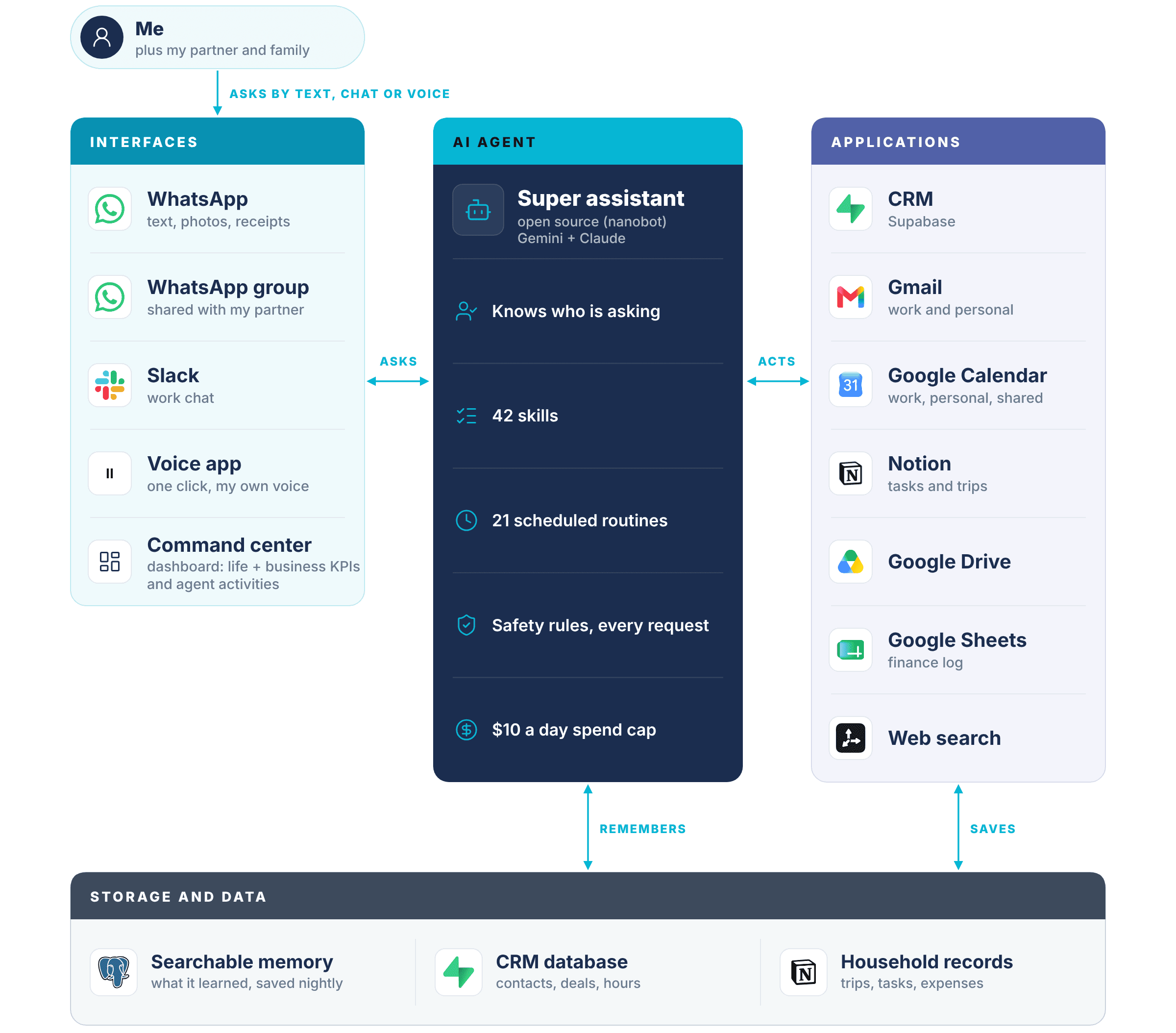
One assistant across 9 apps, reached by WhatsApp, Slack, voice or a dashboard. It knows who is asking.

AI teammates that share one company brain

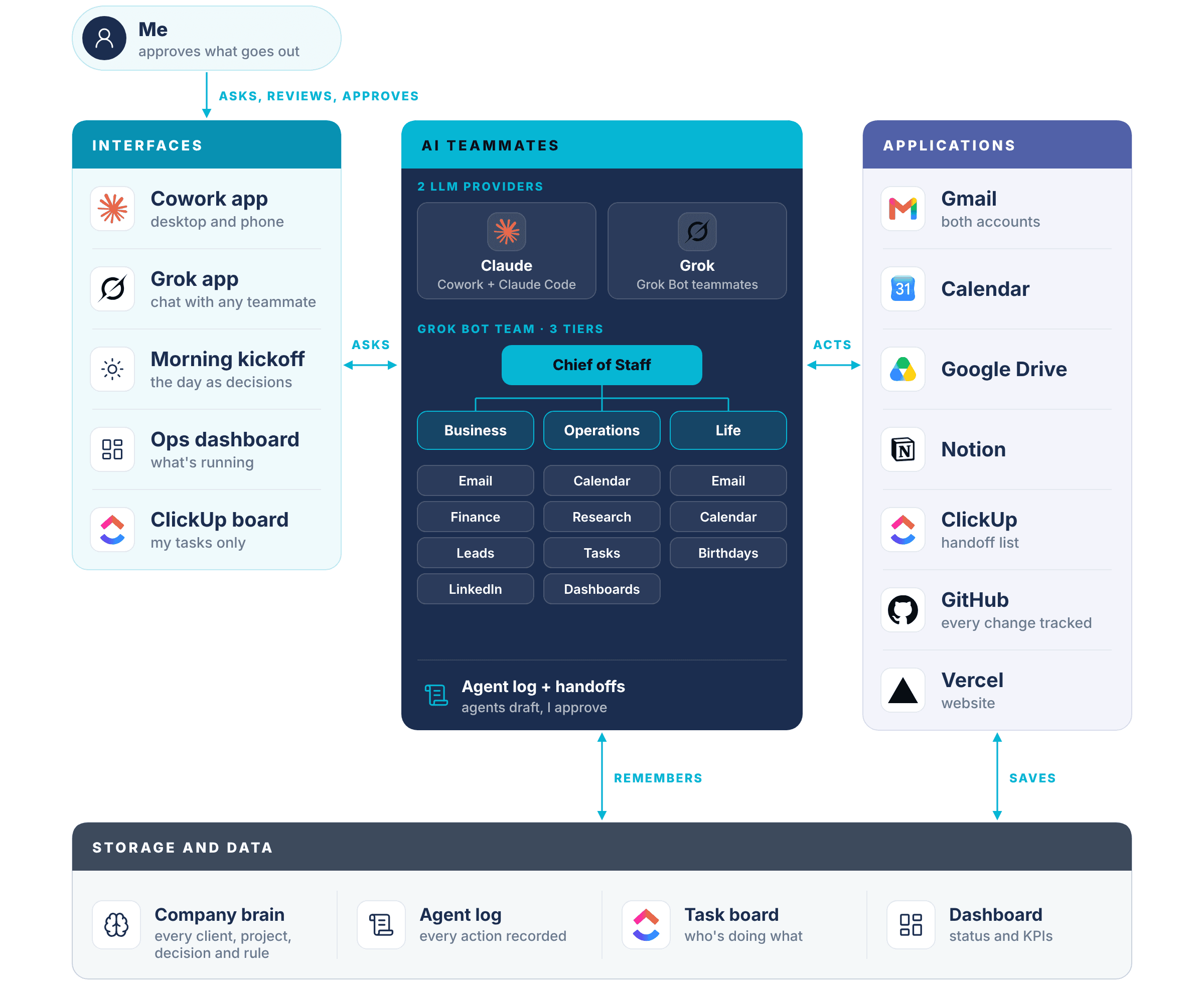
Grok Bot teammates in three tiers plus Claude, reading one company brain, with every handoff logged.

Client build · Tax document intake portal

AI tax document intake portal for a CPA firm

  • 28+ tax form types
  • ~1,000 returns a year
  • In production
  • Firm’s own Azure cloud

Problem

  • Preparers read and retyped every client document into an Excel work paper by hand, each tax season.
  • Each client took 1 to 4 hours, plus a senior review, across about 1,000 returns a year.
  • The work took the equivalent of two full-time people, and it grew one for one with every new client.

Solution

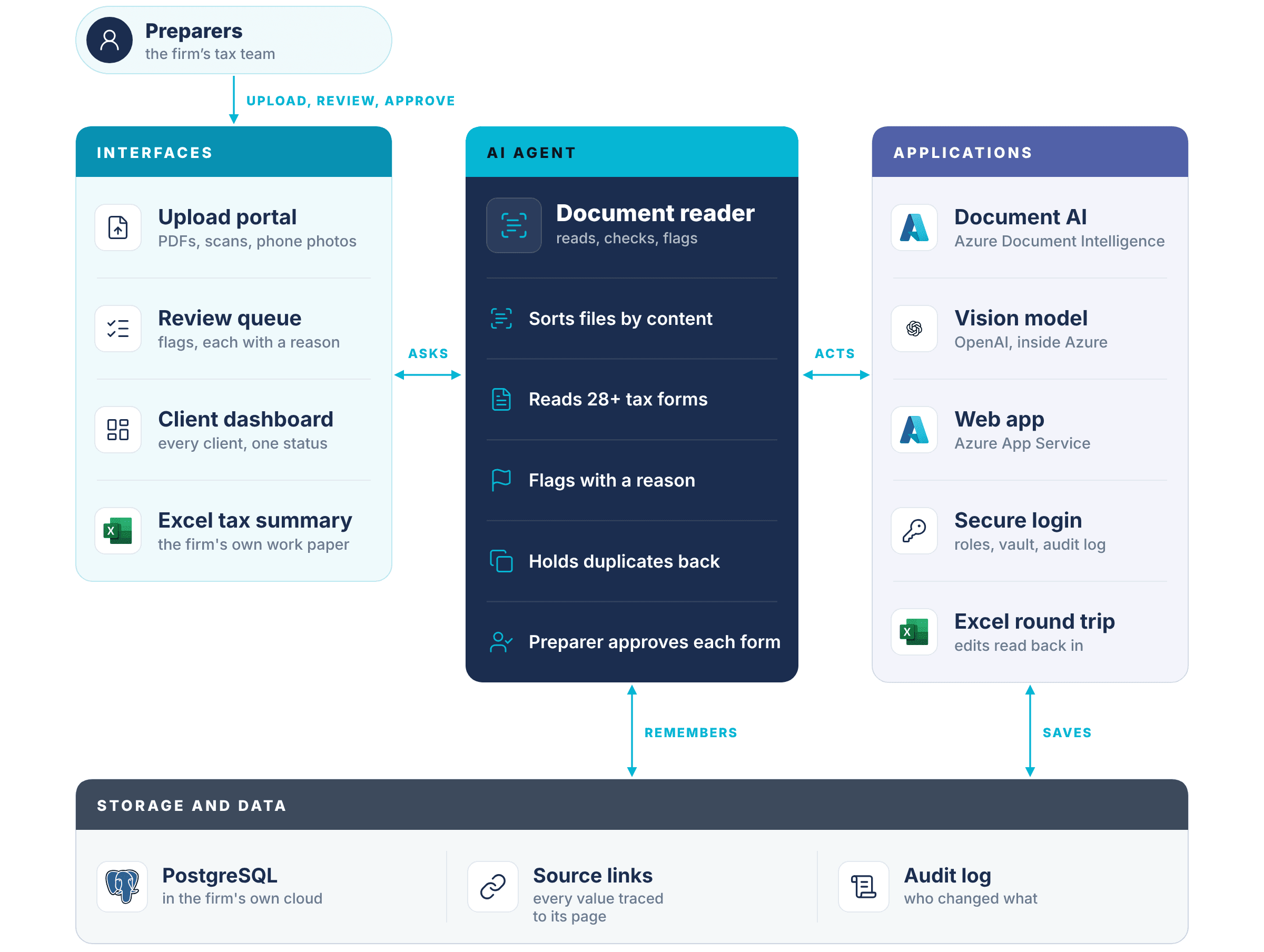
  • A web portal that reads uploaded tax documents with AI: PDFs, scans or phone photos, sorted by what they contain and renamed to the firm’s convention.
  • It summarizes everything in the portal and in an Excel tax summary.
  • It flags anything uncertain for human review, with the reason.
  • A preparer approves every form, and results fill the firm’s own Excel workbook. Edits made in Excel are kept when new forms arrive.
  • A dashboard to see every client’s information and status.

Results

  • Prep time per client reduced from 2.7 hours to 17 minutes
  • About 2,400 hours a year handed back to the team
  • Reads 28+ tax form types, from W-2s and the 1099 family to K-1s, Schedules C and E, and property tax
  • Runs in the firm’s own secure Azure cloud. Client data never reaches a public AI model
  • Secure login with admin and preparer roles, brute-force protection, secrets in a key vault, and an audit log
  • Every number links back to the page it came from
  • A duplicate document the tool held back would have overstated a client’s income by seven figures
  • Crash detection and automatic rollback in about 24 seconds
Client testimonial

For years, we wanted to automate many of our manual tax and workflow processes but struggled to find the right approach. Jaspar helped us bridge that gap.

CPA Director
How it fits together. Select the diagram to enlarge it.

What I learned

  • Designing AI that asks a person when it isn’t sure
  • Combining document AI and a vision model to read 28+ form types
  • Building a multi-user web app inside a client’s own cloud
  • Automated tests and release checks so every deploy is safe
  • Keeping human edits safe when new documents arrive

How this applies to businesses

  • Any team that retypes documents: invoices, claims, loan files, HR forms, purchase orders
  • The same pattern: sort, read, flag for a person, and keep a link back to the original
  • Runs in the client’s own cloud, so sensitive data stays with them

Read the full case study, with the demo video →

Build 01 · My super AI assistant

My own AI super assistant, wired into everything

  • 9 connected apps
  • 5 ways to reach it
  • 42 skills
  • 21 scheduled routines

Problem

  • Separate apps for my business, personal and household work.
  • Typing into each app was the only way in.
  • Different access needed for me, my partner and my family.

Solution

  • One super AI assistant connected to every app I use.
  • I reach it by WhatsApp, Slack, voice or a dashboard.
  • It checks who is asking and uses only the tools that person is allowed.
How it fits together. Select the diagram to enlarge it.

What I learned

  • Building an AI agent from open-source code (nanobot)
  • Picking the right AI model for each job, by cost and quality
  • Managing what the agent knows and remembers
  • Connecting apps through MCPs
  • Running a CRM in Supabase, with searchable memory (RAG)
  • Turning repeat work into skills and scheduled routines
  • Building chat, Slack and voice interfaces
  • A dashboard that tracks my life KPIs, business KPIs and agent activities

How this applies to businesses

  • One super assistant across the tools a team already uses
  • Each role sees only what it should (permission controls)
  • Customer data in one CRM the AI can read and update
  • Reports and follow-ups run on a schedule
  • Employees reach it in Slack, Teams, chat or voice
  • Leaders check one dashboard instead of asking for status

Build 02 · AI agent teammates

AI teammates that share one company brain

  • 3 tiers of AI teammates
  • 2 LLM providers
  • 1 company brain
  • Every action logged

Problem

  • One assistant handled everything, one request at a time. Too slow.
  • Creative work needed context and iterations, which was hard with one assistant.
  • No dedicated agent for each kind of task.
  • No clear view of what was being done, or by whom.

Solution

  • A company brain: every client, project, decision and rule in one place that people and AI both read.
  • Grok Bot teammates in three tiers: a chief of staff, department executives, and specialists for email, calendar, finance, research and tasks.
  • Two LLM providers: Claude for creative work and building software, Grok for the fast-moving teammates.
  • One agent log and task board show every handoff and backlog.
How it fits together. Select the diagram to enlarge it.

What I learned

  • Centralized context that both people and AI agents read
  • Designing AI teammates with clear roles and tiers
  • Matching each task to the right mode and interface
  • Handoffs between AI tools from different companies
  • Permissions: agents draft, I approve anything that goes out
  • Logging every agent action so work is visible and checkable
  • Running work overnight, with a morning kickoff page

How this applies to businesses

  • An AI teammate per department, sharing one company brain
  • Clear roles and handoffs, like a real org chart
  • One log leaders can audit
  • Nothing reaches a customer without a person approving it
  • Company knowledge lives in its own files, not one vendor’s memory

Ready when you are

Ready to see what
you can automate?

Free discovery call. No pitch deck. Just a conversation about your workflows.